Introduction
I was doing a routine UI review of QA Playground's /login and /signup pages when I decided to go deeper and check the security posture too. What I found surprised me — not because the issues were exotic, but because they were so common.
These are exactly the kind of vulnerabilities that sneak into any app when you are focused on getting features working and skip the security checklist. This post documents every issue I found, why it matters, and how I fixed or plan to fix it.
If you are building a web app with authentication, treat this as a practical checklist.
The Setup
- Stack: Next.js (App Router), Better-Auth, PostgreSQL via Prisma
- Pages audited:
/loginand/signup - Auth method: Email + password via Better-Auth's client-side
signIn.email()andsignUp.email()
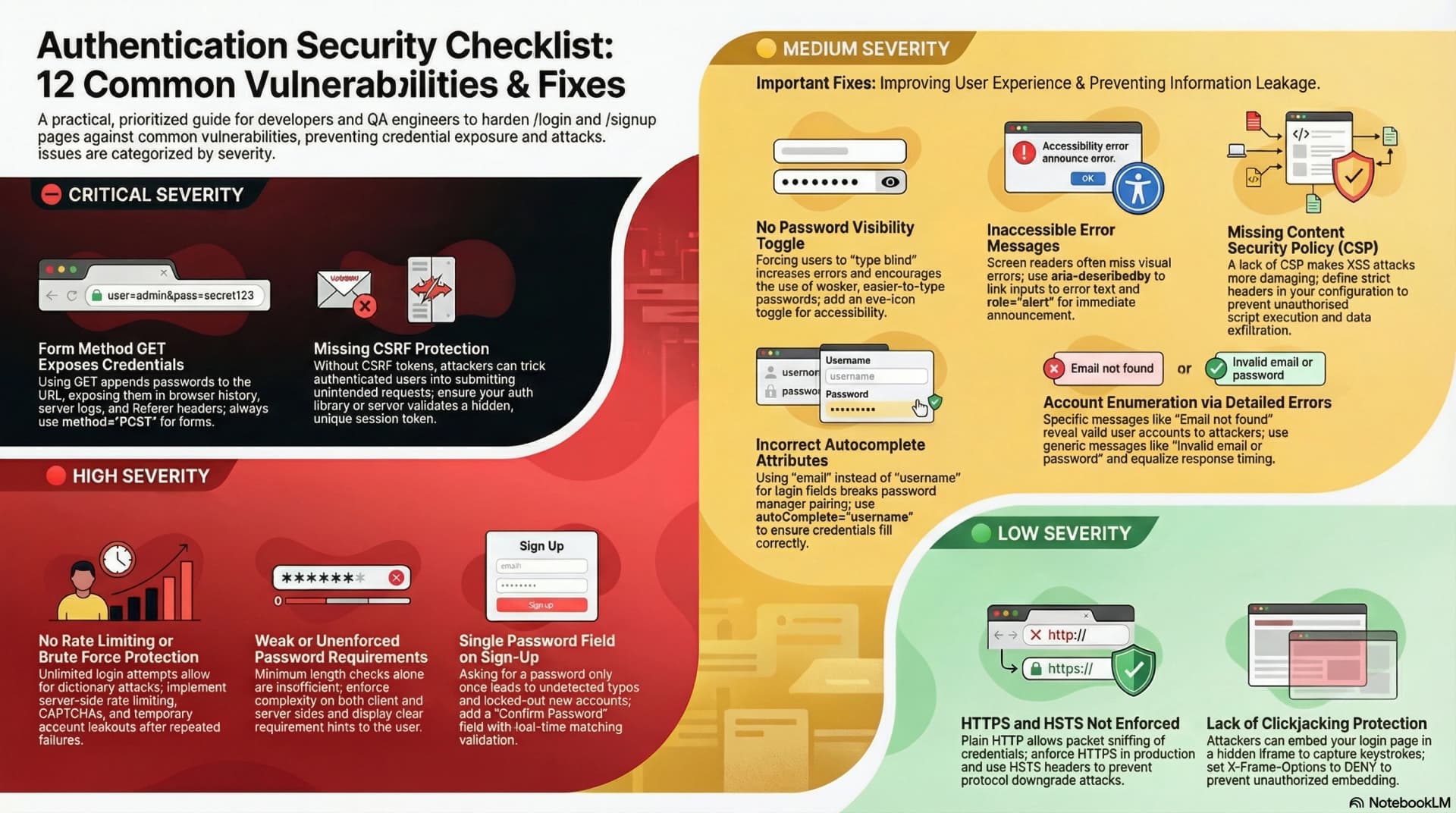
SEC-01 ⛔ CRITICAL — Form Method GET Exposes Credentials in the URL
What the problem is
HTML forms default to method="GET" when no method is specified. A login form submitted with GET appends all field values to the URL:
http://example.com/login?email=user@test.com&password=mypassword123
This is catastrophic for credentials because:
- Browser history stores the full URL — anyone with access to the device can see the password in history
- Server access logs record every request URL — your password lives in plain text in log files
- Referer header — if the page redirects after login, the full URL (with credentials) is sent as the
Refererheader to the next page, including any third-party analytics scripts - Proxies and CDNs may cache or log GET requests
The fix
Always use method="POST" on authentication forms:
<form method="POST" action="/login"></form>In Next.js with a client-side auth library, the risk is already mitigated if you call e.preventDefault() and handle submission via JavaScript — the form never does a native GET submission. But the correct pattern is still to set method="POST" explicitly, both as a security guarantee and as a signal to browsers to treat the form correctly.
SEC-02 ⛔ CRITICAL — No CSRF Protection
What the problem is
Cross-Site Request Forgery (CSRF) attacks trick authenticated users into unknowingly submitting requests to your server. A malicious page can silently submit your login or signup form on behalf of the victim:
<!-- Attacker's page -->
<form action="https://yourapp.com/signup" method="POST" id="f">
<input name="email" value="attacker@evil.com" />
<input name="password" value="attackerpass" />
</form>
<script>
document.getElementById("f").submit();
</script>Without CSRF protection, the server has no way to tell whether the request came from your own page or from an attacker's page.
The fix
Add a CSRF token — a server-generated secret embedded in every form as a hidden field:
<input type="hidden" name="_csrf" value="{{ csrfToken }}" />The server validates that the token in the form matches the one issued for that session. Attackers cannot read this token due to the Same-Origin Policy.
In Better-Auth: CSRF protection is built in and handled automatically when using the Better-Auth client. The client sends requests with the correct headers that Better-Auth validates server-side. You do not need to add CSRF tokens manually when using Better-Auth's signIn.email() and signUp.email() methods.
SEC-03 🔴 HIGH — No Rate Limiting or Brute Force Protection
What the problem is
Without rate limiting, an attacker can try unlimited email/password combinations:
POST /api/auth/sign-in
{ "email": "victim@example.com", "password": "password1" }

POST /api/auth/sign-in
{ "email": "victim@example.com", "password": "password2" }

POST /api/auth/sign-in
{ "email": "victim@example.com", "password": "password3" }

... (repeated millions of times)
A dictionary attack against a weak password takes seconds without rate limiting. Even a strong password is at risk given enough time.
The fix
Implement a layered defense:
Layer 1 — Server-side rate limiting:
// Allow maximum 5 failed attempts per IP per 15 minutes
// On the 6th attempt: return 429 Too Many RequestsLayer 2 — CAPTCHA after repeated failures:
After 5 failed attempts, require a CAPTCHA challenge (Cloudflare Turnstile or hCaptcha are privacy-friendly alternatives to reCAPTCHA).
Layer 3 — Account lockout:
After 10 failures, temporarily lock the account for 15–30 minutes and send an email alert to the user notifying them of suspicious activity.
Better-Auth note: Check your Better-Auth configuration — it has built-in support for rate limiting via the rateLimit plugin. Enable it:
import { betterAuth } from "better-auth";
import { rateLimit } from "better-auth/plugins";
export const auth = betterAuth({
plugins: [rateLimit()],
});SEC-04 🔴 HIGH — No Password Requirements Enforced or Displayed
What the problem is
The sign-up page had a password field with only minLength={8}. No other requirements were enforced. A user could create an account with 12345678 as their password.
Problems:
- No client-side feedback — users don't know what a "strong" password looks like
- No server-side enforcement — the client validation can be bypassed entirely with a direct API call
- Misleading placeholder —
placeholder="••••••••"(8 dots) may imply 8 characters is the target, not the minimum
The fix
Enforce requirements on both client and server:
Client-side validation before submission:
function validatePassword(password) {
const checks = {
length: password.length >= 8,
uppercase: /[A-Z]/.test(password),
number: /[0-9]/.test(password),
special: /[^A-Za-z0-9]/.test(password),
};
return checks;
}Server-side: Better-Auth supports password validation in the server config. Add a custom validator in lib/auth.js to reject weak passwords before they reach the database.
Display the requirements clearly below the password field so users know what is expected before they try to submit.
SEC-05 🔴 HIGH — Single Password Field on Sign-Up
What the problem is
The sign-up form asked for a password only once. If a user has a typo in their password:
- The account is created successfully
- The user cannot log in because they do not know what they actually typed
- Password recovery is the only path — bad UX, and it reveals that the account exists (account enumeration risk — see SEC-10)
The fix
Add a confirm password field and validate that both match before submitting:
const [password, setPassword] = useState("");
const [confirmPassword, setConfirmPassword] = useState("");
const handleSubmit = async (e) => {
e.preventDefault();
if (password !== confirmPassword) {
setError("Passwords do not match.");
return;
}
// proceed with signup
};Show an inline error immediately when the fields do not match — do not wait for form submission.
SEC-06 🟡 MEDIUM — No Password Visibility Toggle
What the problem is
When users cannot see what they typed, they are more likely to:
- Use a simpler password they can type without mistakes
- Fail login repeatedly because they cannot verify what they entered
- Trigger account lockout (see SEC-03) on their own account by mistyping
Forcing users to type blind is a usability problem that has a direct security cost — it pushes users toward weaker passwords.
The fix
Add a show/hide toggle using an eye icon inside the input:
const [showPassword, setShowPassword] = useState(false);
<div className="relative">
<Input
type={showPassword ? "text" : "password"}
id="password"
// ...
/>
<button
type="button"
onClick={() => setShowPassword(!showPassword)}
className="absolute right-3 top-1/2 -translate-y-1/2 text-gray-400 hover:text-gray-600"
aria-label={showPassword ? "Hide password" : "Show password"}
>
{showPassword ? <EyeOff size={16} /> : <Eye size={16} />}
</button>
</div>;Use aria-label on the button so screen reader users know what it does.
SEC-07 🟡 MEDIUM — Error Messages Not Accessible to Screen Readers
What the problem is
The form error messages were displayed visually but had no aria-describedby linking the input to the error. When a screen reader user submits a form with invalid data:
- The input receives focus
- The screen reader reads the input label
- It does not read the error message because it has no programmatic association with the input
This violates WCAG 2.1 Success Criterion 3.3.1 (Error Identification).
The fix
Link each input to its error message using aria-describedby:
<input
id="email"
type="email"
aria-describedby="email-error"
aria-invalid="{!!emailError}"
/>
<p id="email-error" role="alert" className="text-sm text-red-500">
Please enter a valid email address.
</p>role="alert" causes screen readers to announce the error automatically when it appears — no extra interaction required from the user.
SEC-08 🟡 MEDIUM — No Content Security Policy (CSP)
What the problem is
Without a Content Security Policy, the browser will execute any JavaScript that gets injected into the page. This makes XSS (Cross-Site Scripting) attacks significantly more damaging. An attacker who finds an XSS vulnerability can:
- Read the values from the login form fields as the user types
- Exfiltrate the password to a remote server before the form submits
- Redirect the user to a phishing page after "login"
The fix
Add a CSP header in next.config.mjs:
const securityHeaders = [
{
key: "Content-Security-Policy",
value: [
"default-src 'self'",
"script-src 'self' 'unsafe-inline'", // tighten this in production
"style-src 'self' 'unsafe-inline'",
"img-src 'self' data: https:",
"font-src 'self'",
"connect-src 'self'",
"frame-ancestors 'none'",
].join("; "),
},
];Start with a permissive policy and progressively tighten it. Use report-uri to collect CSP violations before enforcing strict rules.
SEC-09 🟡 MEDIUM — Wrong autocomplete Attribute on Login Email Field
What the problem is
The login page email input had autoComplete="email". The correct value for a login form is autoComplete="username", even when the field accepts an email address.
This distinction matters because:
- Password managers use
autocomplete="username"to pair a login field with aautocomplete="current-password"field — that pairing is how password managers know to autofill the credentials together autocomplete="email"signals "fill in any email address" — not "fill in the saved username for this site"- Incorrect autocomplete attributes cause password managers to not autofill correctly, pushing users toward weaker, manually-typed passwords
The fix
<!-- Login page: username + current-password -->
<input type="email" autocomplete="username" />
<input type="password" autocomplete="current-password" />
<!-- Sign-up page: email + new-password -->
<input type="email" autocomplete="email" />
<input type="password" autocomplete="new-password" />SEC-10 🟡 MEDIUM — Account Enumeration via Error Messages
What the problem is
Many login implementations show different error messages depending on the failure reason:
"No account found with this email."— tells the attacker the email does not exist"Incorrect password."— tells the attacker the email does exist but the password is wrong
An attacker can exploit this to enumerate valid email addresses: send login attempts with different emails and watch which message comes back. Once they have a confirmed valid email, they can focus a brute force attack on it.
The fix
Always return the same generic error message regardless of whether the email exists or the password is wrong:
// Always show this, never differentiate
"Invalid email or password. Please try again.";This prevents the attacker from learning anything useful from a failed login attempt.
Important: Also ensure the response time is constant — timing differences between "user not found" (fast DB miss) and "wrong password" (slower bcrypt compare) can leak the same information. Use a dummy comparison when the user is not found to equalize timing.
SEC-11 🟢 LOW — HTTPS Not Enforced (Development Context)
What the problem is
During development the app runs over http://localhost:3000. HTTP transmits all data — including passwords — in plain text. Anyone on the same network can intercept the traffic with a simple packet sniffer.
In production, failing to enforce HTTPS means:
- Login credentials travel over the network unencrypted
- Session cookies can be stolen by a network attacker
- HSTS (HTTP Strict Transport Security) not active — users could be downgraded to HTTP by a man-in-the-middle attack
The fix
In production on Vercel, HTTPS is enforced automatically. Additionally, add HSTS headers in next.config.mjs:
{
key: "Strict-Transport-Security",
value: "max-age=63072000; includeSubDomains; preload",
}This tells browsers to never connect to your domain over HTTP, even if the user types http:// in the address bar.
SEC-12 🟢 LOW — No Clickjacking Protection
What the problem is
Without X-Frame-Options or frame-ancestors CSP directive, an attacker can embed your login page in a hidden <iframe> on their page:
<!-- Attacker's page -->
<style>
iframe {
opacity: 0;
position: absolute;
top: 0;
left: 0;
width: 100%;
height: 100%;
}
</style>
<iframe src="https://yourapp.com/login"></iframe>The user sees the attacker's page content but their clicks land on the invisible iframe. The attacker captures keystrokes and can trick the user into submitting their credentials to an iframe they cannot see.
The fix
Add X-Frame-Options and the frame-ancestors CSP directive:
// next.config.mjs
{
key: "X-Frame-Options",
value: "DENY",
},
{
key: "Content-Security-Policy",
value: "frame-ancestors 'none'",
}DENY prevents your page from being embedded in any frame on any origin, including your own.
Complete Security Headers Setup (Next.js)
Here is the complete headers() block for next.config.mjs covering all HTTP-level security fixes from this audit:
/** @type {import('next').NextConfig} */
const nextConfig = {
async headers() {
return [
{
source: "/(.*)",
headers: [
{
key: "X-Frame-Options",
value: "DENY",
},
{
key: "X-Content-Type-Options",
value: "nosniff",
},
{
key: "Referrer-Policy",
value: "strict-origin-when-cross-origin",
},
{
key: "Strict-Transport-Security",
value: "max-age=63072000; includeSubDomains; preload",
},
{
key: "Permissions-Policy",
value: "camera=(), microphone=(), geolocation=()",
},
],
},
];
},
};
export default nextConfig;CSP is intentionally excluded from this block because it needs per-app tuning. Start with the above and add CSP progressively.
Priority Summary
| Severity | Issue | Action |
|---|---|---|
| ⛔ CRITICAL | Form method GET | Use POST + e.preventDefault() |
| ⛔ CRITICAL | No CSRF protection | Use Better-Auth (already handles it) |
| 🔴 HIGH | No rate limiting | Enable Better-Auth rateLimit plugin |
| 🔴 HIGH | Weak password requirements | Add client + server validation |
| 🔴 HIGH | No confirm password field | Add second password field + match check |
| 🟡 MEDIUM | No password visibility toggle | Add eye icon toggle |
| 🟡 MEDIUM | Error messages not accessible | Add aria-describedby + role="alert" |
| 🟡 MEDIUM | No CSP headers | Add via next.config.mjs headers() |
| 🟡 MEDIUM | Wrong autocomplete on login email | Change to autocomplete="username" |
| 🟡 MEDIUM | Account enumeration via errors | Always return generic error message |
| 🟢 LOW | HTTPS not enforced | Add HSTS header + Vercel handles prod |
| 🟢 LOW | No clickjacking protection | Add X-Frame-Options: DENY |
Key Takeaways
- Security issues in auth pages are high-stakes. These are the pages where credentials are entered. Any vulnerability here directly compromises user accounts.
- Better-Auth handles some of this for you (CSRF, session management) — know what your auth library covers so you are not duplicating protection or, worse, missing something it doesn't cover.
- Password requirements must be enforced server-side. Client-side validation is a UX hint, not a security control — it can always be bypassed with a direct API call.
- Generic error messages are a security feature, not a UX failure. Users do not need to know whether their email exists or their password was wrong. Attackers do.
- HTTP security headers are free. Adding
X-Frame-Options,HSTS,X-Content-Type-Options, andReferrer-Policytonext.config.mjstakes five minutes and closes several attack vectors simultaneously.
This audit was performed on QA Playground's own login and signup pages in March 2026. All issues found were real — none were fabricated for the article.